Google AI Mode is a conversational view inside Google Search that answers a question with generated text and links, and it builds that answer by running many searches instead of one.
What Google AI Mode actually is
Google describes AI Mode as most helpful for queries that need "further exploration, reasoning, or complex comparisons" in its Search Central page on AI features and your website. You ask a nuanced question, get a long answer, and follow up in the same thread. The answer carries links to supporting websites.
It sits next to two siblings. Google AI Overviews is the short summary above classic results, and Google says it only appears when it is "additive", so it often does not trigger. The Gemini app is a separate assistant. AI Mode lives inside Search and draws on the Search index. It deserves its own channel in your tracking because its link set differs from the other two.
In May 2026, according to VertoDigital's write-up of Google I/O, Google redesigned the Search box and let users ask a follow-up straight from an AI Overview and continue in AI Mode with context kept. The same source reports Google's figures of more than one billion monthly AI Mode users and 2.5 billion for AI Overviews. Those are company-reported numbers that this guide could not check against a primary Google post.
How the pipeline works
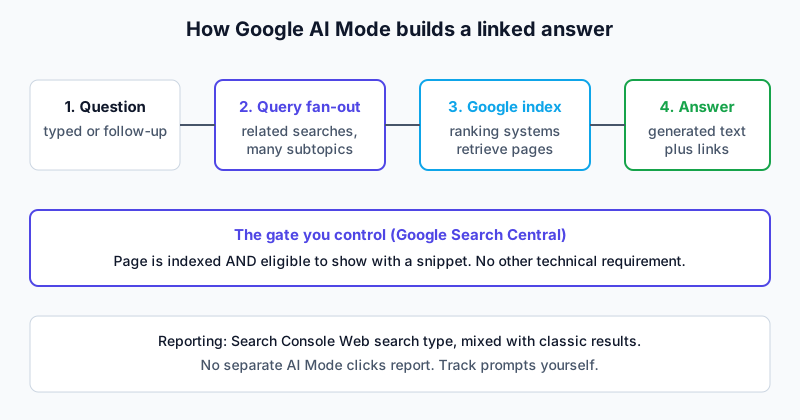
Google's generative AI guide names two mechanisms. Retrieval-augmented generation grounds the model's answer in pages that Google's ranking systems retrieve. Query fan-out generates a set of concurrent, related queries to fetch more results. Google's own example: a question about fixing a weedy lawn fans out into searches on herbicides, chemical-free removal and prevention.
Google also says that while a response is being written, its models "identify more supporting web pages". The practical result is a wider, more varied link set than the ten blue links. Your page does not have to win the typed question; it can win one of the hidden ones.
A worked example of fan-out
Take a buyer asking: "best invoicing software for a five-person agency". Google has not published the sub-queries for that prompt, so the list below is an illustration of the pattern, not observed data.
| Layer | Illustrative search AI Mode might run | Page type that can answer it |
|---|---|---|
| Typed question | best invoicing software for a five-person agency | Category or comparison page |
| Sub-topic | invoicing software pricing per user | Pricing page |
| Sub-topic | tool A vs tool B invoicing | Comparison page |
| Sub-topic | invoicing software reviews 2026 | Review or case study |
| Sub-topic | does invoicing software integrate with accounting tools | Integration documentation |
Research reported by VertoDigital supports the pattern. Nectiv ran about 9,000 prompts through Gemini 3 and counted 9.06 fan-out searches per prompt on average, 11.7 for software prompts. Nectiv used the Gemini API and says it cannot confirm AI Mode behaves identically. A Seer Interactive test cited in the same article found 95% of fan-out searches had no measurable search volume. That is why keyword tools will not list every sub-question.
Follow-ups change the picture
Because the thread continues, the second question is asked with the first still in context. The reviewed walkthrough makes the same point: a user can expand the question, so content should answer the main query and its likely expansions. In practice, the page that earns the first link may not be the one linked for the follow-up. This is the main structural difference from a classic results page, where each query starts from zero.
What Google requires to link a page
The official line is short. A page must be "indexed and eligible to be shown in Google Search with a snippet", and Google writes that there are no additional technical requirements. Meeting them does not guarantee crawling, indexing or serving. The requirements table, the list of things Google says to ignore (llms.txt, chunking, inauthentic mentions) and the preview-control snippets are the same for AI Mode and AI Overviews, so they are set out once in the Google AI Overviews guide rather than repeated here. The actions are in how to rank in Google AI Mode.
One AI Mode point is worth keeping. A page-wide nosnippet takes a page out of the answer, so restrict single sections with data-nosnippet instead of whole pages. Google-Extended is a separate control that Google ties to AI training and grounding in some of its other systems.
What changed in October 2026
LaCleo's analysis, dated 16 October 2026, reports that Google announced five link changes on 15 October 2026. Google's own announcement could not be loaded for this guide, so treat the table as reported by a secondary source that cites it.
| Change | Status (as reported) | Meaning for a site |
|---|---|---|
| Inline links higher and more frequent | Rolling out | A single sentence can earn a link inside the generated text |
| "Dive deeper" links with image thumbnails | Rolling out | The image tied to your page shows next to the link |
| Article carousels and Preferred Sources in more places | Expanding | Timely sources a user picked get a carousel |
| Top section for "one or two official places" for a task | Test | A task-owning site might sit above the answer |
| Clickable creator and publisher names on video results | Test | Names open a Google Search profile, not your site |
LaCleo adds that Google has not published how official sites are chosen or which image feeds the thumbnails. Both gaps are open. Anyone selling a formula for either is guessing.
Measuring AI Mode traffic
Google says sites in AI features are counted in the Search Console Performance report under the Web search type. It also says clicks from AI Overviews pages tend to be higher quality, meaning more time on site.
Google announced a dedicated Search Generative AI performance report on 3 June 2026. Its Search Console Help page says it covers AI Overviews and AI Mode together, so the two cannot be split; the report's scope is described in the AI Overviews guide. Two secondary readings add detail: VertoDigital says it has no queries, clicks or API, and LaCleo says it shows no click-through rate. VertoDigital also gives a data start date of 18 May 2026, which is its claim only and not the launch date.
So tracking has to be by prompt. Pick a fixed list of questions, run them on a schedule, and log whether your domain was linked, which URL, and which competitors appeared. Record the date and location, because answers shift by day and market.
What the data says about clicks
Click behaviour is the unsettled part. Numbers worth knowing, all secondary and dated:
- Pew Research Center (2025), as cited by LaCleo: across 68,879 searches by 900 US adults, people clicked a traditional result in 8% of visits with an AI summary against 15% without, and clicked a link inside the summary in 1%.
- Peec AI, via LaCleo: external links appeared in the answer text of 26.2% of AI Overviews on 20 September 2026, near zero in late August. Sample size undisclosed.
- Kevin Indig's usability study, via VertoDigital: 77.6% of sessions ended without a visit to any external site.
The Pew data is about AI summaries, not AI Mode, and it predates the 2026 link changes. No independent study that was found measures click rates on the new placements. Do not forecast traffic from these figures; use them to see the direction.
Analysis of the reviewed walkthroughs
One transcript was reviewed for AI Mode: a Rankia channel video. The archive holds it twice, as two files that are byte-identical, so it counts as a single walkthrough. The presenter demonstrated a long-tail query about WordPress and Contact Form 7 in AI Mode. The answer pulled information that appeared to come from his own video or site content. He argued that a user can expand the question with follow-ups, so content should answer the main query and its likely expansions in short blocks under headings.
He also recommended an llms.txt file, a JSON catalog in the .well-known folder, consistent business details, author credentials, schema markup, Core Web Vitals, and a Search Console indexing check. His reasoning on page speed was that AI agents struggle with layout shift and deep markup.
Two cautions. First, the walkthrough is one presenter's demo, not a controlled test. Second, his llms.txt and JSON catalog advice contradicts Google's guide, which says Google does not need such files for AI Mode. He may have other AI agents in mind, but Google's documentation does not back those files for AI Mode. His prediction that half of small businesses will struggle in 2027 is opinion and is unverified.
How AI Mode differs from its neighbours
| Trait | AI Mode | AI Overviews | Gemini app |
|---|---|---|---|
| Where it lives | Separate Search view with follow-ups | Above classic results | Standalone assistant |
| When it appears | When the user opens it | Only when Google judges it additive | When the user asks |
| Link behaviour | Fan-out widens the set | Can differ from AI Mode | Grounded by Search when it decides to search |
| Reporting | Web type, combined | Web type, combined | Not in Search Console |
Profound's May 2026 data, via VertoDigital, found AI Overviews and AI Mode shared only about 40% of the companies they mentioned. It is one study, so read it as a reason to track both, not as a law.
Where to go next
For the actions, read how to rank in Google AI Mode. The methodology page explains how evidence is labelled.
Frequently asked questions
Is Google AI Mode the same as AI Overviews?
No. Google says the two may use different models and techniques, so the answers and links differ. AI Overviews only appear when Google decides they add value. AI Mode opens as its own conversational view.
Do I need special markup to appear in Google AI Mode?
No. Google states there is no special schema.org type and no new files or markup required. A page must be indexed and eligible to show a snippet. Structured data is still fine when it matches visible text.
What is query fan-out?
It is Google's term for issuing multiple related searches across subtopics and data sources to build one answer. One typed question can trigger several hidden searches, each of which can surface a different supporting page.
Can I see AI Mode clicks in Search Console?
Not separately. Google counts AI feature traffic in the Web search type. The generative AI report shows impressions by page, with no clicks or queries according to VertoDigital, so prompt tracking fills the gap.
Can I block my content from AI Mode?
Yes, indirectly. nosnippet, data-nosnippet, max-snippet and noindex limit what Search shows, including AI features. They also remove you from the answers, so apply them narrowly.
Does llms.txt help in Google AI Mode?
Google's guide says you can ignore creating unnecessary AI text files like llms.txt for Google's features. Other AI tools may behave differently, which the other engine pages cover.
Limits of this guide
Verified against pages that were opened: Google's AI features page, the generative AI guide, the 3 June 2026 announcement and the Search Console Help page. Reported only: the 15 October 2026 link changes and the "official sites" test (LaCleo, Google's announcement not loaded), the Search Console report's details beyond Google's own help page (VertoDigital), and the Nectiv, Seer, Pew, Peec, Profound and Indig figures, which come through LaCleo or VertoDigital and whose original studies were not opened. Missing: any hands-on test beyond one presenter's demo, which counts once because the two archived files are byte-identical. The fan-out table is an illustration. AI Mode changes often, so verify dated claims.
Sources
- AI features and your website, Google Search Central (last updated 10 December 2025)
- Optimizing your website for generative AI features on Google Search, Google Search Central (last updated 10 July 2026)
- Introducing Search Generative AI performance reports in Search Console, Google Search Central Blog (3 June 2026)
- Generative AI performance report (Search), Search Console Help, Google
- How to Rank in Google AI Mode: Seven Steps to Get Your Pages Linked, LaCleo (16 October 2026)
- How to Rank in Google AI Mode: Step-by-Step Guide for B2B Websites, VertoDigital (23 October 2026)
- Video walkthrough transcript, "how to rank in Google AI Mode and be ready for 2027", Rankia, third-party creator, reviewed 2026 (one transcript, held as two identical files; original URL not located)