To rank in Google AI Overviews you do not need a special trick, because Google's own guidance says the same SEO foundations apply and that no extra technical requirements exist.

How to rank in Google AI Overviews: the order of work
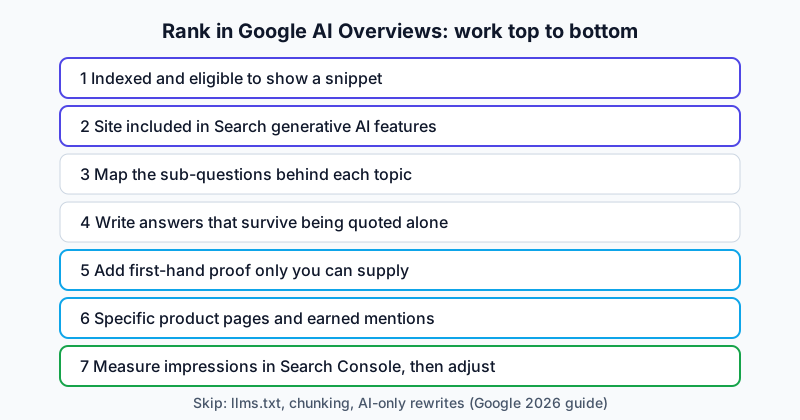
The recommended order is below, because each step is wasted if the one above it is broken. For background on how the feature picks sources, read the overview of Google AI Overviews first.
| Priority | Action | Why it comes here |
|---|---|---|
| 1 | Make sure pages are indexed and can show a snippet | Google says this is the only technical requirement |
| 2 | Check the site is included in Search generative AI features | Google's 2026 guide lists it as a condition for display |
| 3 | Map the questions around each topic | Fan-out searches pull in pages that answer sub-questions |
| 4 | Write pages that can be lifted out cleanly | Summaries quote passages, not whole pages |
| 5 | Add first-hand material | Google names non-commodity content as the main long-run lever |
| 6 | Build detail on product pages and earn real mentions | Commercial queries name brands inside the answer |
| 7 | Measure impressions and adjust | The new report gives page-level visibility |
Nobody outside Google can promise inclusion. Google says even a page meeting every requirement is not guaranteed to be crawled, indexed or served. What follows improves odds.
Step 1: Confirm eligibility before you touch content
Start with the boring checks. Google's AI features and your website page says a page must be indexed and eligible to be shown in Google Search with a snippet to appear as a supporting link. There are no additional technical requirements. This is the master eligibility checklist; the Google AI Mode how-to points back here rather than repeating it.
Run it on the ten pages that matter most:
- Indexed. Search Console's URL Inspection tool shows whether Google has the page. If it says "not indexed", fix that first.
- Crawlable. Google says crawling should be allowed in robots.txt and by any CDN or hosting infrastructure.
- HTTP 200. Google's May 2025 Search Central blog post names a successful status code and indexable content as basics.
- Snippet allowed. Look for
nosnippet,max-snippet:0or heavydata-nosnippetuse that quietly removes you. - Text in the HTML. Important content should exist in textual form. If it only appears after heavy JavaScript, follow Google's JavaScript SEO guidance.
- Included in generative AI features. Google's 2026 guide says a site must be included in Search generative AI features in Search Console to be eligible. Google's help page for the new report adds that a missing report may mean the site was excluded. No official walkthrough of the setting was found for this guide, so check Search Console directly.
Here is the kind of snippet control that causes silent damage:
<!-- Blocks snippets entirely: the page cannot be shown as a supporting link -->
<meta name="robots" content="nosnippet">

<!-- Safer: allow a generous snippet -->
<meta name="robots" content="max-snippet:-1">
If you restrict previews on purpose, accept that Google says more restrictive permissions limit how content is featured in AI experiences.
Step 2: Map the questions around each topic
AI Overviews may use query fan-out, which Google describes as issuing multiple related searches across subtopics and data sources. Hugo Domeur, a French SEO consultant, reports an average of 10.7 sub-queries per search, citing a third-party article. That figure is unverified, so use it only as a sense of scale.
So a page can be pulled in for a sub-question it answers well, even when it does not rank for the headline query. Domeur says some cited sources are outside the top 100 for the original search; that is unverified but matches the mechanism.
To find sub-questions:
- Search the topic yourself and note related questions and the headings used by top results.
- Check Search Console for long, conversational queries that already show your page.
- Read your support tickets and sales calls. Real buyer questions are the best source.
- Inspect an AI assistant's fan-out. One presenter in the reviewed walkthroughs reads the fan-out queries behind a ChatGPT prompt via the browser's network tab. That was ChatGPT, not Google, so use it for ideas only.
Then write the list. For a page on, say, "home battery storage", the sub-questions might look like this:
| Sub-question | Intent | Where it should live |
|---|---|---|
| How much does home battery storage cost? | Commercial research | Main page, price section |
| Does a battery work during a power cut? | Informational | Main page, FAQ |
| Battery storage vs solar-only: which is better? | Comparison | Dedicated comparison page |
| How long does installation take? | Practical | Main page, process section |
| Which brands are reliable? | Brand selection | Roundup or guide page |
Notice the last column: not every question deserves its own URL.
Do not build a page for every variation
Google's 2026 guide is blunt. Creating separate content for every variation of how people might search, or for fan-out queries, primarily to manipulate rankings or generative AI responses violates its scaled content abuse policy, and a high number of pages does not make a site higher quality. One transcript presenter recommends a single strong page covering several related keywords.
The rule that follows: create a new URL only when the question needs its own page to be answered well, because of a different intent or a depth that would crush the main page. Otherwise add a section.
Cover the topic as a cluster
Kenyon's Surfer-based advice goes one step further than single pages. Because AI sources are volatile, he recommends covering a topic from every angle and, to become an authority, building several pieces aimed at different search intents and linked together as a topical cluster. His example tool maps existing coverage from Search Console data and shows gaps. You can do the same on a spreadsheet: list the topic, the intents (learn, compare, buy, fix), the page that owns each, and the gaps.
Step 3: Write pages that can be lifted out cleanly
Google says its systems can understand multiple topics on a page and show the relevant piece, so do not chop content into fragments. The full method for answer-first passages, with a worked before and after, is in the Google AI Mode how-to, and the Gemini how-to covers the same habit for the assistant. Three points are specific to AI Overviews.
- Answer first, then develop. Domeur recommends an inverted-pyramid layout, a direct answer high on the page and paragraphs that make sense without the surrounding context. A short summary box suits long articles.
- Name the subject. Repeat the key term instead of "it" and "this", so a quoted passage survives extraction.
- Show a date and an author. Kenyon lists freshness and visible expertise as traits of repeat sources.
Webconversion advises a 40-50 word answer under each heading. Google does not ask for that; treat it as an editorial habit, not a template.
On freshness, Domeur cites SE Ranking 2025 data: over half of AI Overview results dated from 2025 (28.76%) or 2024 (26.85%). That is unverified. Update real facts, not just the date stamp.
On media, Google recommends supporting text with high-quality images and videos. Domeur claims about 30% of AI Overviews include a YouTube video and that a hand-written transcript can help. Treat both as unverified.
Step 4: Add first-hand proof, detailed money pages and real mentions
Be non-commodity
Google's 2026 guide says unique, compelling, useful content will likely influence presence in generative AI search over the long run more than any other suggestion in the guide. Its example: "7 Tips for First-Time Homebuyers" is commodity content, while a first-person account of waiving an inspection and finding a sewer line problem is non-commodity.
Ask of every page: what can only this site say? Options include:
- Data from your own customers, usage or operations (anonymised and accurate).
- A test you ran, with the method stated and the limits admitted.
- Photos, screenshots or measurements you took.
- A named expert with a real track record, quoted accurately.
- A failure or surprise from your own work.
The Goldie transcripts push the same idea: each page should contain a real case study the writer actually tested. Checking AI-assisted drafts by hand is sensible regardless.
Make money pages specific
Kenyon argues marketers were taught to sell outcomes over features, but late-stage buyers ask product questions: will it integrate with my stack, what fields does it offer? If your page does not answer, an AI answer may leave you out or, he says, get facts wrong. His recommendation: longer, more thorough revenue pages, with Apple's product pages as his example.
This applies to product, pricing, service and comparison pages. A starter template:
| Section | What to include |
|---|---|
| What it is | One plain sentence, brand and category named |
| Who it is for / not for | Honest fit statement |
| Specifications or inclusions | Facts a buyer needs, as a table |
| Pricing logic | Ranges or formulas where exact prices vary |
| Integrations and requirements | Named, specific |
| Proof | Case study or review with source |
Earn mentions, not manufactured ones
Kenyon's most repeated point is that being mentioned inside the answer can matter more than being a small source link. In his flat-foot running shoe example, the pages ranking for the product query were roundup lists, not the brand's own site. His advice follows: get featured in roundup posts, community forums and industry directories, and contact the writers of those lists.
Google's 2026 guide adds a limit: seeking inauthentic "mentions" across the web isn't as helpful as it might seem. The sensible reading: earn mentions by being worth including, with a good product, a useful comparison and honest outreach.
Protect the top and bottom of the funnel
Kenyon describes AI Overviews as disrupting both ends of the funnel. At the top, non-branded informational queries (what is the Mediterranean diet, how to choose a running shoe) are answered in the panel, so the click may never happen. At the bottom, commercial queries name brands. His implication: do not measure informational pages by clicks alone, and make sure your brand is the one named when the question turns commercial.
Local businesses
Digitaleo argues that AI Overviews can crowd the classic local pack and reduce visits to source sites, and recommends keeping Google Business Profile listings complete (reviews, posts, current details), publishing quality visuals and writing for natural-language, long-tail queries. This is a French agency's opinion with no data attached, but the actions are cheap and consistent with Google's note that business information should be current.
What to skip, according to Google
Many "GEO hacks" are sold as essential. Google's 2026 guide lists several you can ignore for Google Search.
| Tactic | Google's position (2026 guide) |
|---|---|
llms.txt and special AI files |
Not needed; Google Search ignores them; harmless if made for other services |
| "Chunking" content into tiny pieces | No requirement; no ideal page length |
| Rewriting content only for AI systems | Not needed; systems understand synonyms and meaning |
| Chasing every long-tail variation | Not needed; separate pages for each can violate spam policy |
| Overfocusing on structured data | Not required; no special schema; still useful for rich results |
| Third-party tools claiming internal Google metrics | Be wary; no third party has access to internal systems |
Webconversion calls Schema Markup essential for AI Overviews, which goes beyond what Google says. Add markup where it is accurate and matches visible text, and do not expect it to flip a switch.
Analysis of the reviewed walkthroughs
Four distinct transcripts were reviewed, all from SEO firms or software sellers, and their claims are treated as hypotheses. The full description of each is in the AI Overviews overview; the table below only checks which advice matches Google's documentation.
| Walkthrough advice | Matches Google's documents? |
|---|---|
| Rank in the top 10 first (Kenyon, citing Surfer) | Consistent with ranking systems feeding AI features; the 70% figure is Surfer's, not Google's |
| Be the source with real case studies (Goldie) | Consistent with Google's non-commodity content point |
| Be everywhere across several sites and a community (Goldie) | Partly: Google warns that inauthentic mentions are not helpful |
| Publish within 24 hours of a new topic (Goldie) | No Google statement found |
llms.txt and chunking are unnecessary (software founder) |
Matches the 2026 guide |
| AI-written pages still work in some niches (software founder) | Opinion; Google says quality and spam standards apply |
The Goldie presenter reports a page ranking within three days for "best AI SEO community". Figures quoted by presenters in the two Goldie videos are self-reported and differ between them, so none is repeated here. No walkthrough has a comparison group, so how often the same tactics work for another site is unknown.
Measure, learn and adjust
Google announced the Search Generative AI performance reports on 3 June 2026, with a note saying they reached all websites worldwide as of 31 August 2026. The Search Console Help page says the report covers AI Overviews and AI Mode together, and shows impressions by page, country, device and date. It has a 1,000-row limit and an export button.
A simple monthly routine:
- Open the report and export impressions by page.
- List your top 20 pages by generative AI impressions and your top 20 by organic clicks. Compare the lists.
- For pages with impressions but weak engagement, read the page as a stranger would and tighten the answer.
- For important pages with none, check indexing, snippet controls and the include/exclude setting from Step 1.
- Check conversions in your analytics. Google says clicks from pages with AI Overviews are higher quality, though that is Google's claim, so verify it on your own data.
Two limits matter. The report documents impressions, not clicks, and it cannot separate AI Overviews from AI Mode. For prompt-level tracking of the conversational surface, see how to rank in Google AI Mode.
To finish, here is the one-afternoon version: check indexing and snippet controls on your top ten pages, confirm the Search Console generative AI setting, add one thing only you can say to one page, rewrite its first paragraph so it survives being quoted alone, and check the report in a month. Background on how sources are chosen is in the Google AI Overviews overview, and the methodology explains how evidence is treated.
Frequently asked questions
Can I rank in Google AI Overviews without ranking on page one?
Possibly, but it is the exception. Surfer's data, as relayed by Kenyon, puts 70% of sources in the top 10, and Domeur claims some sit outside the top 100 because of fan-out. Aim for strong rankings and sub-question coverage.
Should I add FAQ schema to win overviews?
Google says no special schema is needed and structured data should match visible text. Accurate markup is fine as normal SEO, but it guarantees nothing.
Do I need an llms.txt file?
Not for Google. Google's 2026 guide says Google Search ignores such files and that creating them neither helps nor harms visibility. If other services you care about read them, that is a separate decision.
How long does it take to appear?
Nobody can say. Google says recrawling after a preview-control change can take days to months. The Goldie transcripts claim a three-day ranking, a self-reported anecdote.
Is a brand mention better than a link?
Kenyon says mentions inside the answer are often more advantageous than a citation, and ideally you get both. It is his view, not a measured study. Google also says inauthentic mentions are not helpful.
Can AI-written content work?
Google says AI tools are fine when the result meets its quality and spam standards, and it stresses non-commodity content. One presenter claims AI-written pages still work in some niches, which is unverified. Use AI for drafting and add real, checked material.
Limits of this guide
Verified against pages that were opened: Google's AI features page, the 2026 generative AI guide, the 2025 Search Central post, the 3 June 2026 announcement and the Search Console Help page. Reported only: Surfer's statistics (from Kenyon's video), and the 10.7 sub-queries, the SE Ranking freshness split, the 30% YouTube share and the 40-50 word answer length, all from the French articles named in the body. Missing: an official page for the Search Console include/exclude setting. The battery table and the product-page template are illustrations written for this guide, not real data. Video figures are self-reported and differ between videos. No controlled experiment on Google AI Overviews was run, and nobody outside Google can see how sources are selected.
Sources
- AI features and your website, Google Search Central (last updated 10 December 2025)
- Optimizing your website for generative AI features on Google Search, Google Search Central (last updated 10 July 2026)
- Top ways to ensure your content performs well in Google's AI experiences on Search, Google Search Central Blog (21 May 2025)
- Introducing Search Generative AI performance reports in Search Console, Google Search Central Blog (3 June 2026)
- Generative AI performance report (Search), Search Console Help, Google
- Video walkthrough transcript, Surfer AI Overviews research explained, Matt Kenyon (Kenyon Digital), third-party creator, reviewed 2026 (original URL not located)
- Video walkthrough transcript, "How I get my websites ranked number one in Google AI overviews", Julian Goldie avatar (Goldie Agency), third-party creator, reviewed 2026 (original URL not located)
- Video walkthrough transcript, "geo examples how I rank number one inside a search engines", Julian Goldie avatar (Goldie Agency), third-party creator, reviewed 2026 (original URL not located)
- Video walkthrough transcript, software founder reading Google's official AI SEO guide, third-party creator, reviewed 2026 (original URL not located)
- Google AI overview : comment ça marche et s'y rendre visible ?, Webconversion (published 22 July 2026, modified 15 October 2026)
- Google AI Overview : Présentation et comment y apparaître, Hugo Domeur (10 August 2026)
- Google AI Overview : quel impact sur votre SEO local ?, Digitaleo blog (date not shown)