To rank in Google AI Mode, a page first has to be indexed and allowed to show a snippet, and after that it wins links by answering one of the many searches AI Mode runs behind a single question.

Start here: what "ranking" means in Google AI Mode
There is no rank number in AI Mode. There is a set of links attached to a generated answer, and the job is to be in it. The Google AI Mode overview covers the mechanics. This page is the action list.
Google's own position is blunt. Its Search Central page on AI features and your website says the best practices for SEO remain relevant and "there are no additional requirements to appear in AI Overviews or AI Mode". Its newer guide on optimizing for generative AI features says the same thing in more detail. This guide takes that at face value.
So the work divides into three layers, in this order:
- Eligibility. Can Google index the page and show a snippet?
- Coverage. Does your site answer the questions AI Mode searches in the background?
- Presentation. Can a passage be lifted out cleanly and linked?
Measurement runs alongside all three.
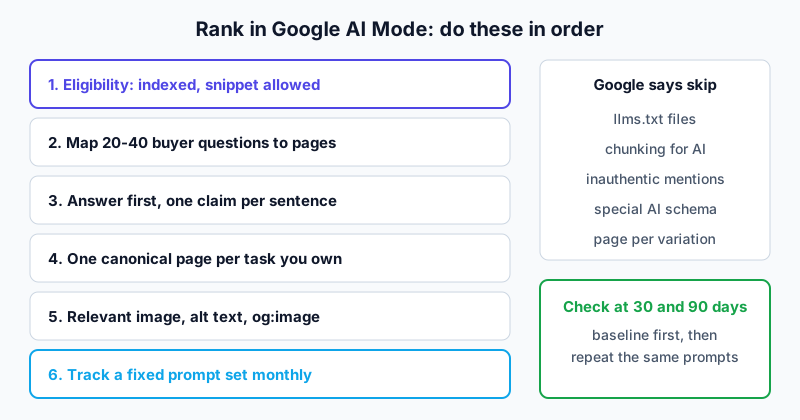
Step 1: Fix eligibility before anything else
The master checklist (indexing, robots.txt, HTTP 200, snippet controls, text in HTML, the generative AI setting) lives in how to rank in Google AI Overviews, because the gate is identical for both features. Run it first. Two checks matter more in AI Mode than elsewhere.
Firewalls and walls
VertoDigital adds a practical warning: make sure your CDN or firewall is not challenging Googlebot, and that key facts are not behind a login, a form or blocked scripts. Use URL Inspection in Search Console on a few priority pages and read the rendered HTML.
Stale duplicates
Old pricing pages, retired product pages and duplicate URLs can surface instead of the current page, so an answer quotes a price you no longer charge. Point old versions to the current one with redirects or canonical tags. Google's guide lists reducing duplicate content among its fundamentals.
The generative AI setting
VertoDigital reports that a property must be included in "Search generative AI features" in Search Console to be eligible, and that subdomain or URL-prefix properties may inherit the setting from a parent. Google's own guide also lists inclusion as a condition for display. If you run several subdomains, check each one. This is a five-minute look that could explain a zero.
Eligibility checklist
- Googlebot allowed in robots.txt and in CDN or WAF rules.
- Top commercial pages indexed, confirmed in URL Inspection.
- No nosnippet or max-snippet:0 on pages you want linked.
- Search Console generative AI setting set to include (and parents checked).
- Outdated duplicates redirected or canonicalised.
Step 2: Map the questions behind the question
AI Mode uses query fan-out. Google defines it as a set of concurrent, related queries generated by the model to fetch more relevant results. So one typed question touches many pages.
You cannot list every sub-question. Seer Interactive, as cited by VertoDigital, found 95% of fan-out searches had no measurable search volume. Nectiv's analysis of about 9,000 prompts through Gemini 3 found 9.06 fan-out searches per prompt on average, with "reviews", "vs" and the year among the most common terms. Nectiv used the Gemini API and says it cannot confirm AI Mode matches, so read this as a hint about shape, not a spec.
Build a question sheet
Start with 20 to 40 questions real buyers ask. VertoDigital suggests drawing them from sales call objections, support tickets, site search and Search Console. Give each an owner page.
| Question type | Page that should answer it | Typical gap |
|---|---|---|
| Is this the right kind of product? | Product or solution page | Vague positioning copy |
| How does it compare to X? | Comparison page | No dated comparison, no table |
| How do I set it up or move over? | Guide or documentation | Steps missing or outdated |
| Has it worked for someone like us? | Case study | No starting point or result stated |
| What does it cost and why? | Pricing page | Factors that change the price are hidden |
The spam-policy limit on page-per-variation publishing is covered in the AI Overviews how-to. In short: strengthen the page that should own the answer, and create a new page only when readers need something that does not yet exist.
Plan the follow-up, not just the first answer
AI Mode is a thread. After the first answer a user typically narrows, compares or asks about a constraint. Add a second column to the question sheet: the likely next question.
| First question | Likely follow-up | Page that must be ready |
|---|---|---|
| Best invoicing software for a small agency | Does it work with my accounting tool? | Integration documentation |
| Tool A vs tool B | Which is cheaper for five users? | Pricing page with per-seat logic |
| How do I move from spreadsheets? | How long does migration take? | Migration guide with a realistic time range |
| Is it secure? | Where is data stored? | Security or compliance page |
These pairs are an illustration of the method, not observed AI Mode behaviour. The reviewed walkthrough made the same point in general terms: answer the main query, then its expansions, in short blocks under headings.
Step 3: Write passages that stand alone
AI Mode links sentences and passages, not whole pages. LaCleo says inline links sit on a word or phrase, so a page needs sentences that state one fact each. VertoDigital makes the same point from the retrieval side and cites Cyrus Shepard's review of 54 AI citation studies, which ranks answer placement near the top, close query-answer match and self-contained passages among the strongest signals. Shepard himself calls these correlations, not confirmed ranking factors, according to VertoDigital.
Google, for its part, says you can ignore "chunking" content. Both can be true: do not cut pages into tiny blocks, but a clear opening answer under each heading is just good writing.
Before and after
Before (typical product copy):
The future of invoicing is here. Built for modern teams, our platform brings everything together.
After:
Acme Invoice is invoicing software for agencies of two to twenty people. It creates invoices from tracked time, sends payment reminders and syncs paid invoices to your accounting tool, so a small team can stop chasing payments by hand.
The second version names the product, the audience and three actions. Lift any sentence out of context and it still says who does what. The product here is invented for illustration.
Three habits
- Name things. Write the product name, not "it".
- One claim per sentence, with its number. "Setup takes about 30 minutes for a single cluster" is quotable. "Setup is quick" is not. (Use only numbers you can support.)
- Match format to job. Tables for real comparisons, numbered lists for real processes, prose otherwise.
Open every section with a one or two sentence answer to its own heading, and put the date and source inside the sentence that makes the claim.
Keep content in text
Google lists "important content is available in textual form" among the fundamentals. LaCleo adds that important content should not live inside images or tabs that load only after a click. If your pricing table is an image, AI Mode has nothing to quote.
Step 4: Give every task you own one official page
The newest and least certain piece. LaCleo reports that on 15 October 2026 Google began testing a section at the top of some answers showing the "one or two official places" to complete a task, with context on why each is useful. Google has not published how it chooses these sites. Treat everything below as sensible hygiene, not a proven tactic.
For each task you own, pick one canonical URL and make it unambiguous:
| Task | Canonical page | Check |
|---|---|---|
| See pricing | /pricing | Only one page states current prices |
| Book or buy | /book or /checkout | Not duplicated by campaign pages |
| Get support | /support | Contact details match everywhere |
| Read documentation | /docs | Old versions redirect or are labelled |
| Return a product | /returns | Policy matches Merchant Center |
Then align the signals Google itself mentions: consistent business details, structured data that matches visible text, and current Business Profile and Merchant Center information. LaCleo suggests Organization structured data that matches the visible text. Google says no special schema is needed for AI features, so this is ordinary markup done properly, not an AI trick.
If three pages describe your pricing, Google has no single page to show for that task. That is LaCleo's reasoning; it is sound but unconfirmed.
Step 5: Treat images as part of the answer
LaCleo reports that "Dive deeper" links at the end of some answers now show image thumbnails, a change it says was rolling out from October 2026. Google has not documented which image it picks. The low-risk response: place a relevant primary image near the top of the page, write descriptive alt text, and set a matching og:image. Google's guide already says to support text with high-quality images and video where applicable.
Step 6: Add what nobody else has
Google's generative AI guide puts unique, non-commodity content ahead of most other suggestions, according to VertoDigital. The contrast: commodity content restates common knowledge, while non-commodity content adds first-hand expertise or original information.
Useful types:
- Benchmarks with the test setup explained.
- Case studies stating the starting point, what changed and the result.
- Documentation that plainly lists what the product does not do.
- Original data from support tickets, usage or surveys.
VertoDigital also cites Surfer's 2026 citation analysis, which it says found first-hand experience scored higher in AI Mode than in other engines tracked. It is one source, so do not rebuild a site on it.
Step 7: Mind third-party sources, honestly
VertoDigital cites McKinsey for the claim that a brand's own site is often only 5-10% of the sources AI search references, with the rest from publishers, review sites and communities. It also reports Profound's May 2026 data putting YouTube and Reddit at the top of AI Mode's most-cited domains. These are secondary figures; the originals were not opened.
The action is modest: run your buyer questions in AI Mode, list the third-party pages it cites, and fix what you control, such as review profiles and partner listings. The line not to cross is stated by Google: seeking inauthentic mentions "isn't as helpful as it might seem" because the AI features rely on the same spam systems as Search.
Step 8: Measure what you can, track the rest
Google says AI feature traffic appears in the Search Console Performance report in the Web search type. Its generative AI performance report, announced on 3 June 2026, adds page-level impressions for AI Mode and AI Overviews combined; the monthly export routine is in the AI Overviews how-to. VertoDigital says it has no queries, clicks or API; its 18 May 2026 data start date is its own claim, not the launch date. Since AI Mode cannot be isolated there, your exports and prompt log become the trend line.
Track a fixed prompt set
Run the same questions on a schedule and log the result. A simple log:
| Field | What to record |
|---|---|
| Prompt | The exact question typed |
| Feature | AI Mode, AI Overviews, or both |
| Placement | Inline link, end-of-answer card, official section, carousel, or not linked |
| Linked URL | The page Google actually linked, often not the one you targeted |
| Competitors | Other domains linked in the same answer |
| Date and location | Answers change by day and by market |
Record mention, link and recommendation separately; they are three different outcomes. LaCleo recommends the same placement-level logging. For a wider comparison, see how Google AI Overviews and the Gemini app behave, and the methodology for how evidence is graded.
A filled row might read: prompt "does Acme Invoice sync with Xero", feature AI Mode, placement inline link, linked URL the integrations page (not the pricing page you expected), competitors two review sites, date and country noted. That one row already tells you which page to strengthen.
Read conversational queries, carefully
VertoDigital notes that AI Mode follow-ups appear in Search Console as ordinary queries such as "show me more" or "what about [competitor]". Do not add them up. Suganthan Mohanadasan found 57.7% of impressions over 59 days in his own data sat in Google's anonymised pool, so what you see is a floor.
Connect it to outcomes
AI-influenced visits rarely show in click attribution. VertoDigital suggests adding AI search as an option in a "How did you hear about us?" field. Google also says clicks from AI Overviews pages tend to be higher quality, so compare engagement on landing pages against a prior period.
Analysis of the reviewed walkthroughs
One walkthrough was reviewed for AI Mode, a Rankia video held in the archive as two byte-identical transcript files, so it counts once. The presenter checked a long-tail query about WordPress and Contact Form 7 in AI Mode and saw the answer pull from his own content. His takeaways: target the main keyword, then make sure the site has headed chunks that answer likely expansions. He also stressed Search Console indexing checks, Core Web Vitals, consistent business and author details, schema markup and a Google Business Profile for local businesses.
The evidence suggests the follow-up and indexing advice lines up with Google's fan-out and eligibility language. The Core Web Vitals claim, that layout shift makes AI agents struggle, is his argument and no Google statement tying Web Vitals to AI Mode links was found. Google lists page experience among general fundamentals, nothing more specific. His advice to create llms.txt and a JSON catalog contradicts Google's guide, so skip them for Google and decide separately for other engines.
What to skip
Google's full "ignore" list (llms.txt, chunking, rewriting for AI, structured-data obsession) is in the AI Overviews how-to. Two items are specific to AI Mode advice found in the sources:
| Common advice | What the evidence says | Verdict |
|---|---|---|
| Buy mentions in listicles | Google: inauthentic mentions are not as helpful as they seem | Avoid |
| "Request Indexing gets you into AI Mode in a day" | VertoDigital found no source behind the claim | Ignore |
| Cut every page into tiny blocks | Google: no requirement to chunk | Write clear sections, do not over-split |
A realistic 30 and 90 day plan
VertoDigital says there is no reliable timeline. A sensible check:
- Days 1-30: Finish the eligibility checklist, build the question sheet with follow-ups, fix your pricing and task pages, and record a baseline for 20 to 40 prompts.
- Days 31-90: Rewrite the weakest passages, add original data to one or two pages, repeat the same prompts and compare.
If nothing moves after 90 days, check eligibility again before you rewrite more content.
Frequently asked questions
Do I need to rank number one on Google to appear in AI Mode?
No. AI Mode runs related searches and can link a page that answers one sub-question clearly. Ranking well still helps. Google says meeting requirements does not ensure serving.
Is AI Mode SEO different from regular SEO?
Technically no. Google says the same SEO best practices apply and nothing extra is required. The difference is in page structure, because answers link individual passages. Clear opening answers and coverage of related sub-questions matter more than a single keyword.
Does schema markup help me rank in Google AI Mode?
Google says there is no special schema for AI features. Structured data is still worthwhile when it matches the visible text and supports rich results. Do not add markup describing content readers cannot see.
Does llms.txt help with Google AI Mode?
Google's guide says you can ignore unnecessary AI text files such as llms.txt. The reviewed walkthrough recommends it anyway, but Google's documentation does not support it for these features. Other AI engines may read it, which is a separate question.
How do I see AI Mode results in Search Console?
They are mixed into the Web search type in Performance. The combined generative AI report is impressions only, per VertoDigital. For clicks and placement, track prompts yourself.
Can I stop AI Mode using my content?
Use nosnippet, data-nosnippet, max-snippet or noindex, per Google. These also remove your content from answers, so apply them only where needed.
Will optimizing for AI Mode help in other engines?
Partly. Clear answers and original information help broadly, but other engines use their own indexes. See how to rank in Gemini for the closest Google sibling.
Limits of this guide
Verified against pages that were opened: Google's AI features page, its generative AI guide and the 3 June 2026 announcement. Reported only: the October 2026 link changes and the "official sites" test (LaCleo, Google's announcement not loaded), the Search Console setting and report details (VertoDigital), and the Nectiv, Seer, Shepard, Surfer, McKinsey, Profound and Mohanadasan figures, whose original studies were not opened. Missing: any hands-on test beyond one presenter's demo, and any evidence of how Google selects official sites or thumbnails. The question sheets, the follow-up table and the logged-prompt example are illustrations written for this guide. No controlled test was run, and Google's behaviour changes often.
Sources
- AI features and your website, Google Search Central (last updated 10 December 2025)
- Optimizing your website for generative AI features on Google Search, Google Search Central (last updated 10 July 2026)
- Introducing Search Generative AI performance reports in Search Console, Google Search Central Blog (3 June 2026)
- How to Rank in Google AI Mode: Seven Steps to Get Your Pages Linked, LaCleo (16 October 2026)
- How to Rank in Google AI Mode: Step-by-Step Guide for B2B Websites, VertoDigital (23 October 2026)
- Video walkthrough transcript, "how to rank in Google AI Mode and be ready for 2027", Rankia, third-party creator, reviewed 2026 (one transcript, held as two identical files; original URL not located)