To rank in Brave Search, start with the unglamorous part: make sure Brave's crawler is allowed to fetch your pages at all, because everything else depends on it. Brave publishes no list of ranking factors and no official webmaster console, so this guide separates what Brave documents from what is inference. The order below follows impact: access first, indexing second, content third, authority fourth, measurement last.

Before you rank in Brave Search: what is known and what is not
Brave Search runs its own index. The company's Search API page says its index is "crawled, ranked, and served end to end", with no dependency on Google or Bing (source: Brave Search API). That makes it a separate discovery channel, and also a smaller, less documented one.
The evidence in this guide falls into three groups:
- Documented by Brave: crawler behaviour, noindex handling, Web Discovery Project, Goggles, Rerank, AI features.
- Reported by third parties: tips from agency blogs and a community forum.
- Inference: judgment calls, labelled as such.
For the full background first, read the overview of Brave Search AI. For how sources are weighed, see the methodology.
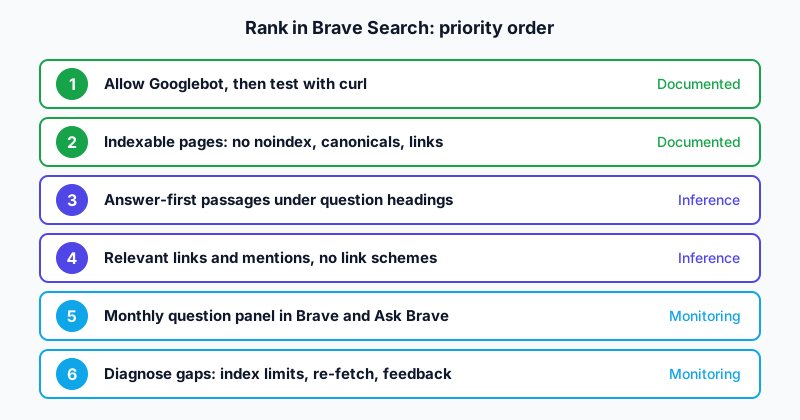
Step 1: Allow Googlebot, then test it
This is the Brave-specific rule that surprises people. According to Brave's crawler page, the Brave Search crawler does not advertise a differentiated user agent, and if a domain or page is not crawlable by Googlebot, Brave Search's bot will not crawl it either (source: Brave Search Crawler). Brave explains the reason: it does not want to be discriminated against by sites that allow only Google.
Two things follow. You cannot allowlist a "Brave bot" by name, and a CDN rule that blocks "unknown bots" can silently hide you. Some vendor guides say to allowlist "Bravebot". Brave's own text says there is no separate agent, so no rule should be built around that name.
A minimal robots.txt
Keep it boring. This example allows everything for everyone and points to the sitemap:
User-agent: *
Allow: /

Sitemap: https://www.example.com/sitemap.xml
If you must block areas such as an admin path, do it for all agents, and double-check that Googlebot is not caught by a stricter group:
User-agent: *
Disallow: /admin/

User-agent: Googlebot
Disallow: /admin/
Test with a Googlebot user agent
Request an important page with Googlebot's user agent string and check the response:
curl -s -o /dev/null -w "%{http_code}\n" \
  -A "Mozilla/5.0 (compatible; Googlebot/2.1; +http://www.google.com/bot.html)" \
  https://www.example.com/your-page/
You want a 200. A 403 or a challenge page means a firewall or bot rule is treating Googlebot-like requests as hostile. One caveat: some systems verify Googlebot by IP address, so a spoofed user agent from your laptop may be blocked while the real Googlebot passes. If your test fails, check the firewall log before you conclude anything.
Do this for a sample of templates: home page, an article, a category page, a product page.
Step 2: Make pages indexable and discoverable
Crawl access does not equal inclusion. Run through this list on every template:
- The page returns 200, not a soft 404 or a redirect chain.
- No
noindexin the robots meta tag or theX-Robots-Tagheader. - The canonical URL points to the page itself, or to the preferred version.
- The main text is in the HTML, not injected after a login or a consent wall.
- The page is linked from at least one other crawlable page.
- The sitemap contains the canonical URL.
Brave's crawler page contains an important instruction for removal: robots.txt is not used to prevent a page from being indexed; use the robots noindex directive. After you add it, Brave must re-fetch the page to apply it, and the help page links a form to request a re-fetch (same source). The same logic applies in reverse: if a page is missing and you want it in, ask yourself first whether a stray noindex is on it.
Request a re-fetch and report gaps
Brave offers a feedback button on its results page. A community member in the Brave forum notes that if information is outdated, or a business or site seems missing, you can use the feedback button to tell the search team, and they will often update (source: Brave SEO Ranking, Brave Community). That is a forum answer, not an official promise, so treat the outcome as uncertain. For a page that no longer exists, Brave's crawler page gives a URL submission form and the address not-found@brave.com.
Help Brave discover you
Brave says its crawler is partially powered by the Web Discovery Project, an opt-in feature in the Brave browser that contributes anonymized information (source: Brave Search Crawler). Brave's Search API page adds that the index is built from anonymous contributions by browser and search users.
Little can be done about this directly, and manipulation should not be attempted. The sensible reading is simple: pages that real people find and visit have a better chance of being discovered. That is inference. Brave does not state how much weight these signals carry. The overview covers how the Web Discovery Project feeds the index.
Practical discovery work:
- Link important pages from your navigation and from related articles.
- Keep an XML sitemap current. Brave does not document sitemap handling on the pages reviewed, so consider this a general crawler convention, not a Brave guarantee.
- Get mentioned where people actually read: communities, newsletters, partner sites.
- Publish pages that are worth sharing, because sharing creates visits.
Step 3: Write passages that can be quoted
Brave's help describes AI Answers as concise summaries with references, and Featured Snippets as an extraction of "the most relevant snippet of text" from one source (source: AI in Brave Search). Brave's featured-snippet page adds that snippets are based on page content in its index (source: Featured snippets).
So the writing target is a passage that answers a question without needing the page around it. Here is a pattern to apply to a heading and its first paragraph.
Before:
Our approach
We take a holistic view of crawling and think there are many factors involved in how sites do on search engines, which we are happy to talk about.
After:
Why does Brave skip some pages?
Brave's crawler does not fetch a page that Googlebot is blocked from. If a firewall rule returns 403 to Googlebot, the page is also absent from Brave's index. Fix the rule, confirm a 200 response, and wait for a re-crawl.
The second version has a question as a heading, a direct first sentence, one cause, one action. Nothing guarantees a citation, but it removes the reasons an extractor would skip you.
A quick content checklist
- Put the direct answer in the first one or two sentences under each H2.
- Use one idea per paragraph.
- Name things precisely: product names, version numbers, dates.
- Add a table when the reader compares options, and a list when steps have an order.
- State a date on time-sensitive facts.
- Cite your sources inline. It helps readers and keeps you honest.
Structured data
Schema markup can help any engine understand a page. Brave's Search API page says results can be "schema-enriched", which suggests structured data is read, but it does not say it affects ranking in the consumer product. Keep it accurate and visible-content-based. A minimal Article block:
{
  "@context": "https://schema.org",
  "@type": "Article",
  "headline": "How to rank in Brave Search",
  "datePublished": "2026-10-29",
  "dateModified": "2026-10-29",
  "author": { "@type": "Person", "name": "Mohamed CISSE" }
}
Adapt the values to your page. Do not mark up content that is not on the page.
Step 4: Build authority the ordinary way
Here the evidence is weakest. Brave does not publish a "backlink formula". A forum poster with five years of SEO experience argues that for one medical article, ranking first on Google but lower on Brave points to domain authority and backlinks, and that backlinks "appear to carry more weight" on Brave (source: Brave Community thread). Another poster says Brave takes much longer than Google to index, and that user interaction eventually led to ranking, taking eight months for their site. A third says that since Brave has no console, traditional SEO plus backlinks is the way to go.
Read these as field reports. They are consistent with each other and with how most search engines work, but none comes from Brave, and none is controlled. The agency guide from Pipeline Velocity (30 July 2026) takes a similar line: it says there is no public list of Brave ranking factors and that backlinks are "likely important". The word "likely" is the honest part.
The practical reading:
- Earn links from relevant sources: industry sites, partners, communities you genuinely take part in.
- Skip link schemes: they carry risk everywhere and Brave gives no reason to think it is different.
- Be consistent about your brand name across your site and profiles, so that mentions add up.
- Cover a topic in depth with connected pages rather than one isolated post.
Claims not to act on yet
A GEO vendor article (CapstonAI, May 2026) lists steps such as minimizing trackers, honoring Global Privacy Control, and getting cited on Hacker News. It states that high tracker counts "correlate with downranking" in its own cohort tests. No Brave documentation supports this, and the vendor does not publish its method. The same article presents one anonymized customer case in which Brave citations on a 25-prompt panel rose from 2 to 14 over a quarter; with no method published, that is a single unverified case and not a benchmark. Reducing third-party scripts is good for speed and privacy anyway, so do it for those reasons. Just do not expect a measured Brave ranking gain on the strength of that article.
Understand Goggles and Rerank
You cannot optimize for a ranking that every user can alter. The mechanics of Goggles and Rerank are explained in the Brave Search AI overview; the table shows what they mean for a site owner.
| Feature | Who controls it | What it does to your site |
|---|---|---|
| Default ranking | Brave | Baseline position |
| Goggles | Any person or community | Can boost or demote domains, patterns or topics |
| Rerank | The individual user | Can raise or discard your domain for that user |
| Brave Search API Goggles | The developer | Can pick which sites ground an AI product |
The consequence is practical. A developer community might publish a Goggle that favours technical documentation. If your pages are specific and well-made, a rule like that helps you. If they are thin, it removes you. Your lever is quality, not trickery.
Step 5: Watch the AI layer
Brave's AI features are AI Answers, Ask Brave, Featured Snippets and AI-powered descriptions (source: AI in Brave Search). Brave says provenance matters and that it always shows where information comes from. You can therefore check your own visibility by asking Brave questions that your pages answer and reading the references.
A simple method:
- Write 15 to 25 questions your pages answer. Use real phrasing from customer emails or search logs.
- Ask each one in Brave Search and in Ask Brave once a month.
- Record in a spreadsheet: the date, the question, whether your domain appears in the sources, and which URL.
- Change one thing at a time on a page and re-test after a few weeks.
A panel row can be as plain as this:
| Date | Question | Domain cited? | URL cited | Change made since last test |
|---|---|---|---|---|
| 2026-11-01 | Why does Brave skip some pages? | No | none | none (baseline) |
| 2026-12-01 | Why does Brave skip some pages? | Yes | /blog/brave-crawl-rules/ | Rewrote H2 and first sentence |
The values are illustrative. Keep the baseline row: without it a later citation cannot be attributed to any change.
Brave also notes in its featured-snippet page that good snippets may reduce click-through to the sites providing the content, and that the company is "conflicted" about this. Plan for being cited without being clicked.
Developer-side exposure
Brave sells its index through the Search API, with web search, LLM Context, Answers, images, videos and news endpoints (source: Brave Search API). Brave claims major AI labs use it, without naming them. If that is accurate, being indexed by Brave could mean exposure in third-party products too. Which products is unverified, so treat it as a possible bonus, not a promised one.
Step 6: Know the limits of the index
Brave's Google fallback help page says the index is still being refined for less common queries. This helps explain why a page can sit first on Google and nowhere on Brave: if Brave has not indexed it, or does not index much for the query, you are simply absent.
A diagnosis table for the common situations:
| Symptom | Most likely cause | First check |
|---|---|---|
| Page never appears in Brave | Blocked or not crawled | Googlebot test, noindex, firewall logs |
| Page appears for brand but not topics | Thin or isolated content | Internal links, depth, passages |
| Competitors appear in AI sources, you do not | Weak extractable passages or fewer mentions | Rewrite headings and first sentences, build mentions |
| Ranking fell after a site move | Redirect or canonical error | Status codes, canonical tags |
| Old page still shows | Not re-fetched yet | Request re-fetch, check headers |
A realistic schedule
A workable order, over about six weeks:
- Week 1: Googlebot test, robots.txt, noindex audit, firewall rules.
- Week 2: indexability list on every template, sitemap, canonicals.
- Weeks 3 and 4: rewrite your 10 most important pages with answer-first passages.
- Weeks 5 and 6: outreach and mentions, set up the monthly question panel.
Then wait. Do not change a dozen things at once, since the effect of each change would be impossible to separate.
Server-side checks that need no Brave tool
Because there is no console, your own data is the feedback loop. Three checks cost nothing:
- Googlebot health. Search your access logs for Googlebot requests that return 4xx or 5xx on important URLs. Brave inherits that permission, so every such error is also a Brave risk.
- Referrers. In your analytics, filter sessions whose referrer contains
search.brave.com. A small, steady number is normal for a new site; a sudden zero after a deploy points to a crawl or noindex regression. - Header audit. Run
curl -sIon ten key URLs and confirm there is noX-Robots-Tag: noindexleft over from a staging configuration.
Log what you find next to the monthly question panel, so access problems and citation changes can be read together.
Frequently asked questions
How do I rank in Brave Search?
Make your pages crawlable by Googlebot, free of stray noindex rules, linked together, and written as clear, quotable passages. Then earn relevant links and mentions. Brave publishes no ranking-factor list, so the last step is inference.
Do I need to allow a Brave user agent in robots.txt?
Brave says its crawler does not advertise a differentiated user agent. The rule to remember is that a page blocked to Googlebot is also not crawled by Brave. Allow Googlebot and test it.
Does Brave have webmaster tools?
Brave documents no official webmaster console, and community members say there is none. You verify by searching for your pages and reviewing server logs. Brave does provide a re-fetch request form and a feedback button.
Do backlinks matter more on Brave than on Google?
One forum poster believes so, based on one page. No Brave source confirms it. Backlinks probably help discovery and trust, as on other engines, but the relative weight is unknown.
Will blocking trackers help my ranking?
No Brave source says so. A vendor reports a correlation in its own cohort, without a published method. Cutting third-party scripts helps speed and privacy, so do it for those reasons.
How do I remove a page from Brave?
Add a robots noindex directive and let Brave re-fetch the page. Brave states that robots.txt is not used to prevent indexing, and the crawler page links a form to request the re-fetch.
How long does it take to show up?
Unknown. One community poster reports about eight months for their site to rank, while another says indexing is slower than on Google. These are individual accounts, so plan for patience.
Limits of this guide
- Verified: crawler rules, noindex handling, Goggles, Rerank, Google fallback, AI features and the Search API endpoints, read on Brave's own pages on 29 October 2026.
- Reported, not verified: the tracker-count correlation and the 2 to 14 citation case (CapstonAI), the backlink and eight-month anecdotes (forum), and the "likely important" backlink view (Pipeline Velocity).
- Missing: a Brave ranking-factor list, a webmaster console and any statement on discovery-signal weights. No hands-on video transcript exists for Brave, so there is no walkthrough analysis and no first-hand citation test. Advice on backlinks, internal links and passage structure mixes general search practice with editorial judgment and is labelled as such. The curl test uses a spoofed user agent, which systems that verify Googlebot by IP may block.
For the engine itself, read the overview of Brave Search AI. For neighbouring independent-index engines, see how to rank in Perplexity and how to rank in Mistral Le Chat.
Sources
- Brave Search Crawler, Brave help center, read 29 October 2026
- AI in Brave Search, Brave help center, read 29 October 2026
- Featured snippets, Brave help center, read 29 October 2026
- Goggles, Brave help center, read 29 October 2026
- Rerank, Brave help center, read 29 October 2026
- Google fallback mixing, Brave help center, read 29 October 2026
- Brave Search API, Brave, read 29 October 2026
- Brave SEO Ranking, thread in Brave Feature Requests, Brave Community forum (opened 25 October 2022)
- How To Rank In Brave Search, Pipeline Velocity, 30 July 2026
- How to Rank in Brave Search AI 2026: Privacy-First Visibility, CapstonAI, May 2026